Best HubSpot Data Quality Tools 2026: An Honest Comparison Table
The best HubSpot data quality tools 2026 buyers should shortlist depend on the job: HubSpot's Data Hub for built-in duplicates and formatting, Koalify or Dedupely for focused deduplication, Insycle for rule-based bulk operations, and Axon Data for continuous labeling and flagging so AI agents read trustworthy records. Most teams pair native tools with one specialist.
This comparison is written for RevOps and sales leaders at sales-led HubSpot teams, where clean ownership, routing and pipeline data matter most. We make Axon Data, so we're not neutral. To keep this fair, every competitor detail below comes from that vendor's own website or help docs as of October 2026, and we've left out anything we couldn't verify, including pricing and ratings. Check each vendor's site before you buy.
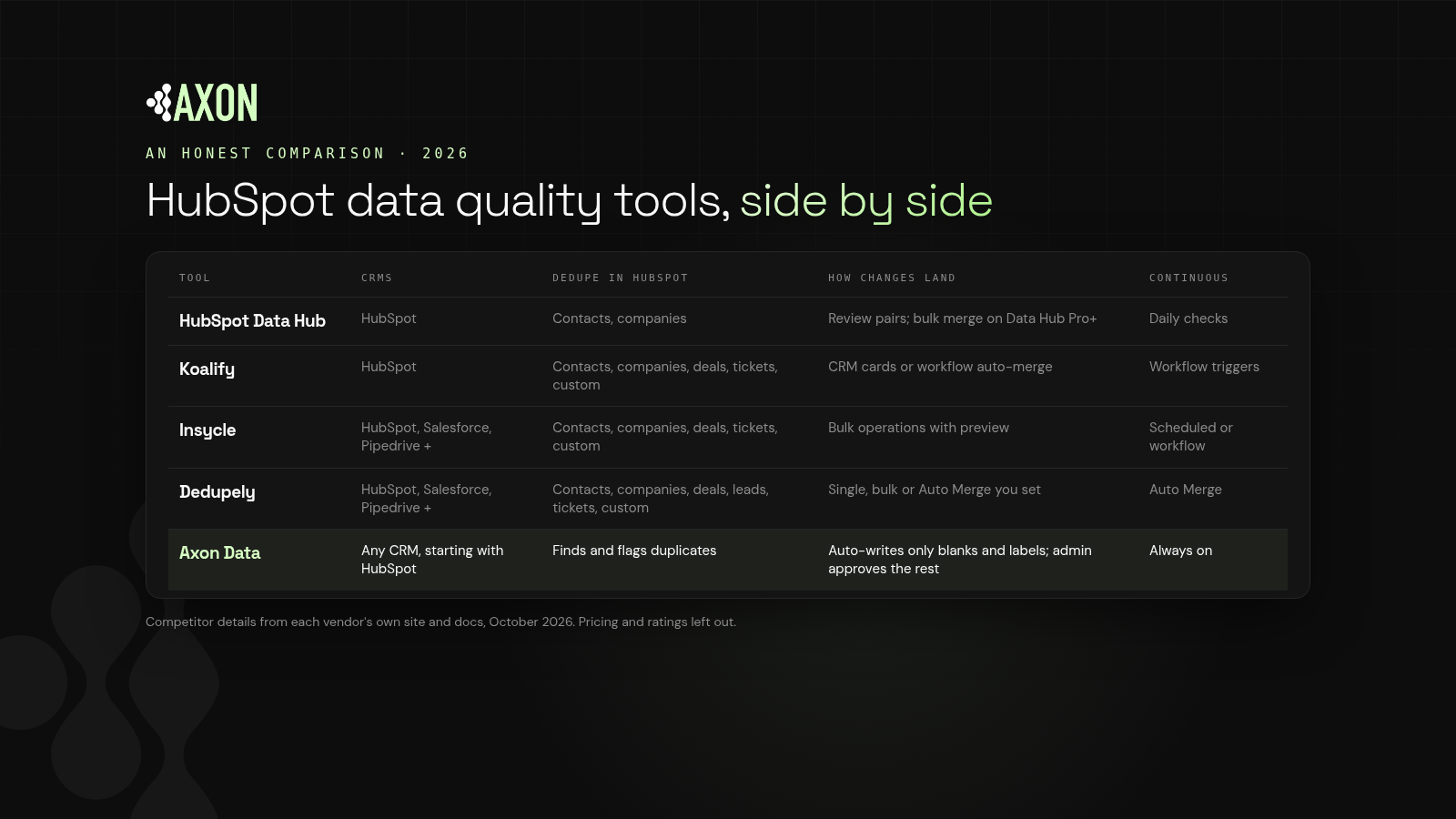
Figure: Five HubSpot data quality tools compared on the CRMs they support, what they deduplicate, how changes land, and what agents get to read.
How should you compare HubSpot data quality tools?
Definition: A data quality tool finds and helps resolve problems in CRM records, such as duplicates, blank or badly formatted fields, inconsistent values and conflicts between related records.
We looked at five questions:
- Which CRMs does it work with?
- Which HubSpot objects can it deduplicate?
- How do changes land: manually, in bulk, or automatically?
- Does it run continuously or only when someone starts it?
- What do agents get: cleaner fields, or labels they can read directly?
How do the best HubSpot data quality tools compare?
| Tool | CRMs | Dedupe in HubSpot | How changes land | Runs continuously | Best for |
|---|---|---|---|---|---|
| HubSpot Data Hub (Data Quality) | HubSpot | Contacts, companies | Review and merge pairs; bulk merge and custom rules on Data Hub Pro/Enterprise | Daily duplicate checks; formatting automation on Data Hub Pro/Enterprise | Teams starting with native tools |
| Koalify | HubSpot | Contacts, companies, deals, tickets, custom objects | Manual merge from CRM cards, or automatic merge via HubSpot workflow actions | Yes, through workflow triggers | HubSpot-only teams that want rule-based auto-merge |
| Insycle | HubSpot, Salesforce, Pipedrive and others | Contacts, companies, deals, tickets, custom objects | Bulk operations with preview; templates and Recipes | Yes, scheduled or workflow-triggered | Rule-based bulk updates and standardization |
| Dedupely | HubSpot, Salesforce, Pipedrive, Close, Nimble, Google Contacts, CSV | Contacts, companies, deals, leads, tickets, custom objects | Single, bulk or scheduled Auto Merge you set up | Yes, via Auto Merge | Multi-CRM deduplication on any HubSpot plan |
| Axon Data | Any CRM, starting with HubSpot | Finds and flags duplicates | Auto-writes only blank fields and labels; admin approves the rest | Yes, continuous | Agent-ready records: labels plus flagged conflicts |
What does each HubSpot data quality tool do?
HubSpot Data Hub (Data Quality tools)
HubSpot automatically deduplicates contacts by email and companies by primary domain on all plans. The duplicates manager, on Professional and Enterprise subscriptions, surfaces contact and company pairs to merge or reject, and checks for new duplicates daily. Data Hub Professional and Enterprise add bulk merging, custom duplicate rules, more visible pairs and automatic formatting fixes for names and emails. HubSpot also offers a Data Agent that populates AI-driven smart properties using HubSpot Credits.
Good fit if you want to stay native and your duplicates are mostly contacts and companies. Watch for irreversible merges and objects outside contacts and companies.
Koalify
Koalify is a deduplication app that runs inside HubSpot. It detects duplicates with rules you configure on any property, including custom ones, across contacts, companies, deals, tickets and custom objects. You can merge from CRM cards on record pages, or bulk and automatically merge through a HubSpot workflow action.
Good fit if you're HubSpot-only and want deduplication to run on autopilot under strict rules. Watch for the fact that auto-merges are permanent, so Koalify itself recommends validating rules before the first bulk run.
Insycle
Insycle is a broader data management platform for HubSpot, Salesforce, Pipedrive and several marketing and support tools. It covers bulk updates and deletes, deduplication with master and retention rules, and standardization. Templates chain into Recipes that run on a schedule or from a HubSpot Workflow, with before-and-after previews.
Good fit if your RevOps team wants to author precise rules and run them at scale. Watch for the maintenance that comes with a growing library of templates.
Dedupely
Dedupely is a deduplication tool for HubSpot, Salesforce, Pipedrive and more. It matches on fields you choose, exact or similar, and supports single, bulk and scheduled Auto Merge. Its docs state that connecting a CRM never triggers automatic merges on its own, and that it works on any HubSpot plan, including free.
Good fit if you run more than one CRM or are on a lower HubSpot tier. Watch for scope: it's focused on duplicates rather than labels or owner checks.
Axon Data
Axon Data is the AI transformation layer for revenue data. It works with any CRM, starting with HubSpot, and runs continuously, never as a one-time cleanup.
- It finds and flags duplicates, owner conflicts and broken associations, with a suggested fix your admin approves, singly or in bulk.
- It only auto-writes blank fields and labels.
- It labels each record, for example ICP fit, segment or status, so agents read one consistent answer.
Good fit if AI agents are becoming the main readers of your CRM. A free CRM scan shows what it would flag in yours. Watch for scope: Axon Data doesn't auto-merge. If you want hands-off merging, pair it with a dedicated merge tool.
Key idea: Deduplication tools answer "Is this the same record?" A data layer for agents also answers "What is this record, and do its related records agree?"
How do you choose a HubSpot data quality tool?
Start native
Use HubSpot's built-in tools first. They're included, and they handle a lot of contact and company duplicates. Our HubSpot duplicate cleanup guide walks through them step by step.
Add a specialist for your biggest gap
- Mostly duplicates, HubSpot only: Koalify.
- Duplicates across several CRMs or a lower tier: Dedupely.
- Bulk updates and standardization rules: Insycle (see our Insycle alternative comparison).
- Sales-led teams with agents reading the CRM, owner conflicts and labels: Axon Data.
Decide who approves what
Write down which changes can run automatically and which need a person. Merges, owner changes and association fixes are hard to reverse.
Assign one owner per field
If you run two tools, make sure they don't edit the same fields.
What else do people ask about HubSpot data quality tools?
What is the best data quality tool for HubSpot?
It depends on the problem. HubSpot's Data Hub tools cover built-in duplicates and formatting. Koalify and Dedupely focus on deduplication, Insycle on rule-based bulk operations, and Axon Data on continuous labeling and flagging for AI agents.
Does HubSpot have a built-in data quality tool?
Yes. HubSpot's Data Quality tools include a duplicates manager, formatting issue fixes, enrichment management and property insights. Bulk duplicate management and formatting automation require Data Hub Professional or Enterprise.
Which HubSpot dedupe tools can merge deals and tickets?
According to their own sites, Koalify, Insycle and Dedupely all support deals and tickets in HubSpot. HubSpot's duplicates manager covers contacts and companies.
Is automatic merging safe?
It can be with strict rules, but merges in HubSpot can't be undone. Validate rules on a small set first, and keep owner and association changes under human review.
Does Axon Data replace HubSpot's tools?
No. Axon Data works alongside them. It finds and flags duplicates, owner conflicts and broken associations, and only auto-writes blank fields and labels.
See where your CRM stands today: duplicates, blank fields, owner conflicts and broken associations.
Get a free CRM scan