How to Fill Blank Fields in HubSpot That Agents Actually Read
To fill blank fields in HubSpot, start with the fields your reps and AI agents actually read, not every property. Measure how many are blank, fill them from sources that write only into empty fields, and stop new blanks at the point of entry. Then keep checking as new records arrive.
A blank field is a small problem for a rep, who can look it up. It's a bigger problem for an agent, which either guesses or skips the record. On a sales-led team, that means leads routed to the wrong territory, call prep with missing context, and account lists that quietly leave out good-fit companies. This guide is for RevOps and sales leaders who want to close the gaps that matter. HubSpot details reflect its Knowledge Base as of October 2026.
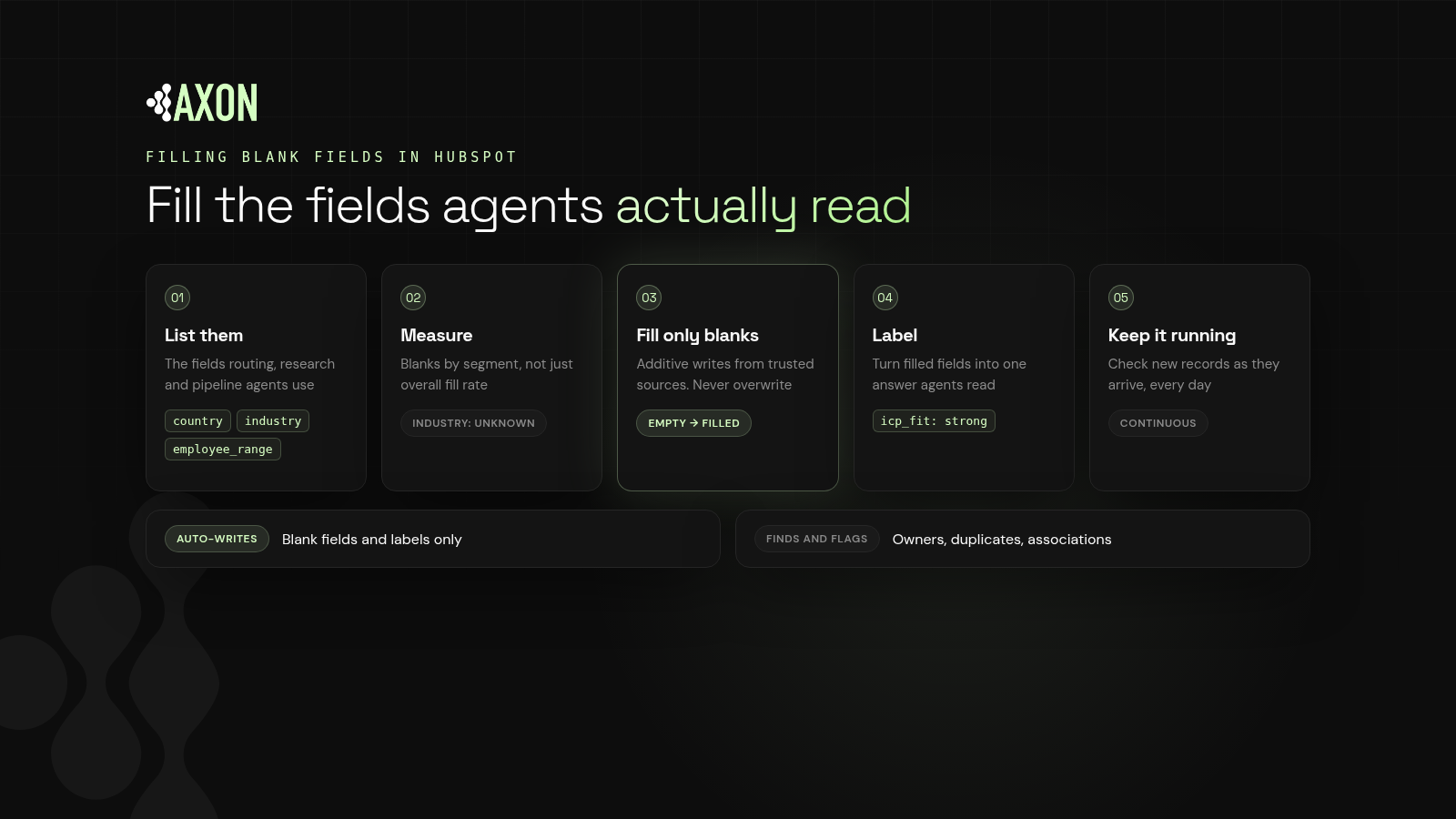
Figure: From hundreds of properties to the handful agents read. Find them, measure the blanks, fill only empty fields from trusted sources, and keep it running.
Should you fill every HubSpot property?
Most HubSpot portals collect properties over years: old campaign fields, one-off imports, fields nobody remembers creating. HubSpot's Data Quality tools even flag properties with no data and properties that are unused. Chasing a 100% fill rate across all of them wastes effort.
Definition: A critical field is a property that a downstream reader, such as a routing rule, a rep view or an AI agent, depends on to make a decision.
The goal is a high fill rate on critical fields, kept high over time.
How do you fill blank fields in HubSpot, step by step?
Step 1: List the fields agents and reps read
Go workflow by workflow. For a typical sales-led team:
| Reader | Fields it depends on |
|---|---|
| Lead routing agent | Country, state/region, employee range, industry, company owner |
| Account research agent | Company description, website, industry, recent activity |
| Rep call prep | Job title, buying role, lifecycle stage, open deals |
| Pipeline review agent | Deal stage, close date, next step, associated company |
| Account scoring | Industry, employee range, ICP fit label |
Your list will differ. What matters is that it's written down. That list is your definition of "complete."
Step 2: Measure the blanks
HubSpot gives you a few places to look:
- Data Quality > Property insights lists properties to review, including ones with no data.
- Report viewer: on contact, company, deal and ticket reports, the Data Quality panel shows property issues and fill rates for the properties in that report.
- Filtered views: filter records where a critical property "is unknown" to see exactly which ones are blank.
Measure by segment, not just overall. A 90% fill rate on industry means little if the gaps sit in your highest-fit accounts.
Step 3: Fill from safe sources
Definition: An additive write fills an empty field or adds a label without changing any existing value. It can't overwrite anyone's work, which makes it the safest kind of automation.
HubSpot data enrichment
HubSpot's data enrichment can fill company and contact properties from its commercial dataset. Per HubSpot's docs, it doesn't consume HubSpot Credits. Automatic enrichment fills blank values only and doesn't overwrite values set by a user or another system. In mapping settings you can choose "Fill empty values only" per property.
One caution from HubSpot's own docs: the Enrich record workflow action and conversational enrichment can overwrite properties regardless of those overwrite rules. Check workflow settings before you run them on your whole database.
Values you already have
Many blanks can be filled from related records. If a contact's company has a country and industry, those values are often already in your CRM, just not on the record an agent reads.
Smart properties
HubSpot's Data Agent can populate smart properties with AI-driven answers from web research, the company website or property data. These consume HubSpot Credits, so use them for fields that justify it.
Reps, last
Ask reps only for what only reps know: buying role, next step, deal context. Everything else should be filled for them.
Step 4: Stop new blanks at the source
Filling blanks is a losing game if new ones arrive faster.
- Required stage properties. In pipeline settings, conditional stage properties can be marked required. Users can't move a deal into that stage until the property has a value.
- Conditional property logic. Require a property based on another value, for example require buying role once a contact reaches sales-qualified. HubSpot notes this logic applies when users edit records manually, not when workflows edit them.
- Form fields. Ask for the routing fields you need on inbound forms.
- Import templates. Map critical fields on every import.
Step 5: Add labels on top
Filled fields are inputs. Agents work best when those inputs become a consistent label.
Definition: Record labeling is attaching a consistent, machine-readable classification, such as ICP fit, segment or status, to each record so every reader interprets it the same way.
This is what makes CRM data AI-ready. Instead of every agent combining industry, employee range and country in its own way, it reads one ICP fit label, and every agent reaches the same answer.
Step 6: Keep it continuous
New contacts, companies and deals arrive every day from forms, imports, integrations and reps. A one-time fill decays as soon as it ends. Check critical fields on new records as they arrive.
How does Axon Data fill blank fields in HubSpot?
Axon Data is the AI transformation layer for revenue data. It works with any CRM, starting with HubSpot, and runs continuously, never as a one-time cleanup.
- It only auto-writes blank fields and labels. It fills empty critical fields and adds labels such as ICP fit, and never overwrites a value your team or another system set.
- For owners, duplicates and associations, it finds and flags them with a suggested fix for your admin to approve.
- It keeps checking new records as they arrive, so critical fields stay filled.
For the owner side of the same problem, see HubSpot owner conflicts. Want to see where your CRM stands today? Get a free CRM scan from Axon Data.
What else do people ask about filling blank fields in HubSpot?
How do I find blank fields in HubSpot?
Use Data Quality > Property insights to see properties with no data, check fill rates in the report viewer's Data Quality panel, and filter records where a critical property is unknown.
Will HubSpot enrichment overwrite my existing data?
Automatic enrichment fills blank values only and doesn't overwrite values set by users or other systems. Manual enrichment, the Enrich record workflow action and conversational enrichment can overwrite, so check your settings.
How do I stop reps from leaving fields blank?
Use required conditional stage properties on deal pipelines and conditional property logic on records. Keep rep-entered fields to what only reps know and fill the rest automatically.
Why do blank fields matter for AI agents?
An agent can't look up what's missing the way a rep can. It guesses or skips the record, which leads to wrong routing, weak call prep and incomplete account lists.
Does Axon Data overwrite fields in HubSpot?
No. Axon Data only auto-writes blank fields and labels. Owners, duplicates and associations are found and flagged for your admin to approve.
See where your CRM stands today: duplicates, blank fields, owner conflicts and broken associations.
Get a free CRM scan