HubSpot Owner Conflicts: How to Find and Flag Them
HubSpot owner conflicts happen when related records disagree about who owns the relationship: a contact owned by one rep while its company belongs to another, a deal outside the account team, or records still assigned to a rep who left. Find and flag each conflict with a suggested owner, then have an admin approve the fix.
On a sales-led team, ownership decides who gets the inbound lead, who gets the task, who runs the renewal and whose pipeline the deal counts toward. When owners disagree, work goes to the wrong rep. AI agents that route leads or draft handoffs make the same mistake, only faster. This guide is for RevOps and sales leaders who want to find these conflicts before reps or agents act on them. HubSpot details reflect its Knowledge Base as of October 2026.
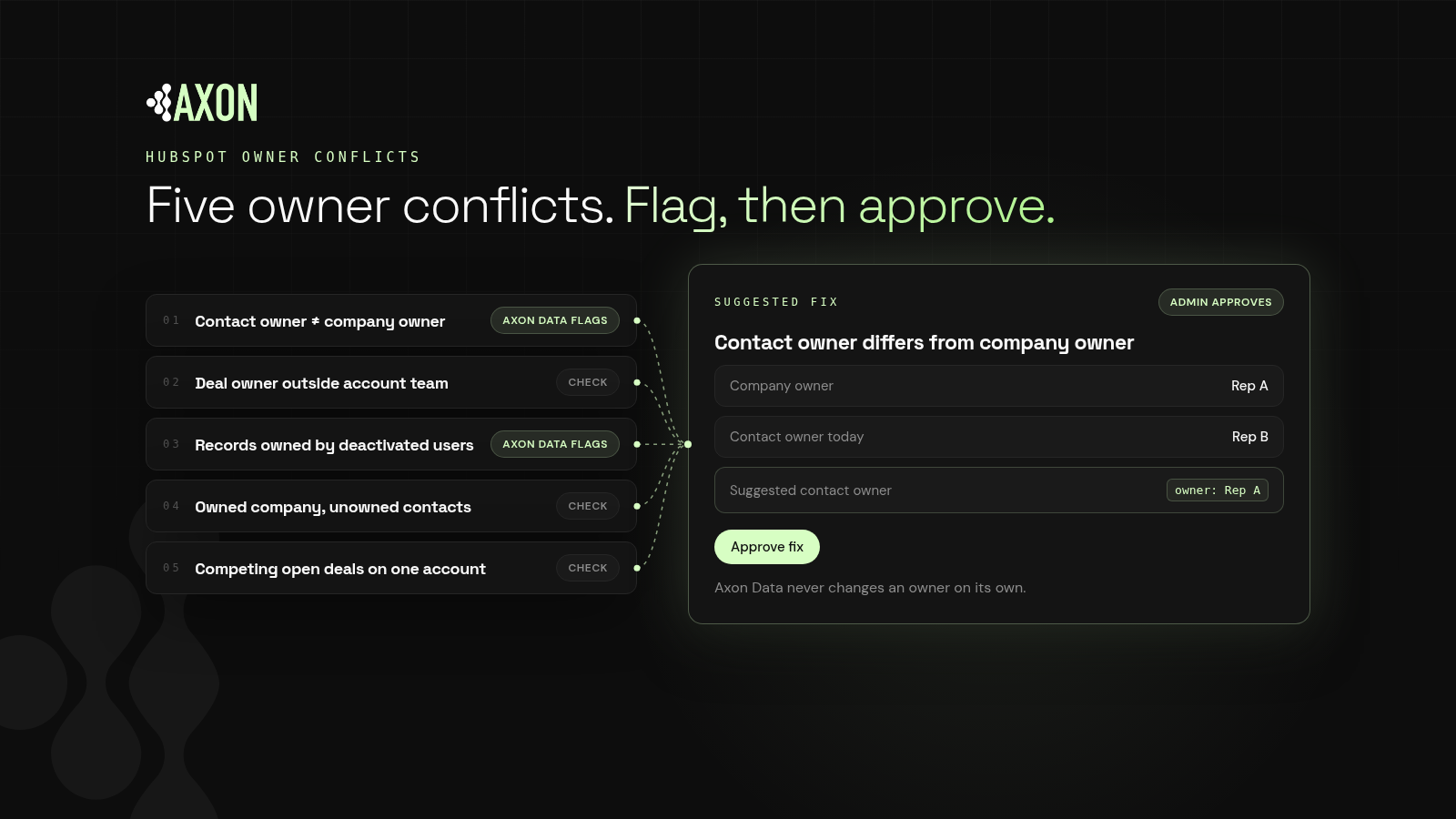
Figure: Five common owner conflicts. Axon Data finds and flags contact-company mismatches and deactivated owners with a suggested owner; the others need a check. An admin approves every fix.
Why do owner conflicts happen in HubSpot?
Definition: An owner conflict is a mismatch in ownership across related records, such as a contact owned by one rep while its company or open deal belongs to another.
HubSpot's docs are clear that the Contact owner and Company owner properties are independent of each other by default. The rep who owns a company may not own its contacts. Conflicts build up from everyday events:
- Territory changes. Companies are reassigned, but their contacts and open deals aren't.
- Reps leaving. Records stay with a deactivated user.
- Inbound and SDR handoffs. A contact is assigned by a rotation before anyone checks whether the company already has an account executive.
- Imports and integrations. New records arrive with an owner set by a list or a sync, not by your territory rules.
What are the most common HubSpot owner conflicts?
1. Contact owner differs from company owner
The most common conflict. A new contact at an existing account gets routed to whoever is next in rotation, not the account executive who owns the company.
2. Deal owner is outside the account team
A deal is owned by a rep with no link to the company owner. Sometimes that's intentional, such as an overlay specialist. Often it's leftover from a reassignment.
3. Active records owned by deactivated users
HubSpot recommends reassigning a user's records before deactivating or removing them. When that step is skipped, companies, contacts and open deals stay assigned to someone who will never follow up.
4. Owned company, unowned contacts
The company has an owner but new contacts arrive with none. Nobody follows up, and agents can't tell who should.
5. Competing open deals on one account
Two reps each own an open deal on the same company for the same product. Competing deals are often duplicates in disguise (see HubSpot duplicate cleanup). Pipeline is double counted and the customer may hear from both.
Does HubSpot sync owners across contacts, companies and deals?
HubSpot has useful tools here. Know what each covers.
The "Assign company owner to contact by default" setting
In contact settings, you can turn on Assign company owner to contact by default. According to HubSpot's Knowledge Base:
- It applies to a contact's primary company association.
- It doesn't update records retroactively, so existing conflicts stay.
- A contact owner you set manually won't revert to the company owner.
- It doesn't affect custom user properties.
It's a good setting for preventing new contact conflicts. It doesn't find the ones you already have, and it doesn't cover deals.
Workflows
You can set owners with workflow actions, including copying a property value to associated records or rotating records between owners. Workflows are powerful, but they apply rules blindly. A workflow that copies company owner to every contact will also overwrite the intentional exceptions.
Bulk reassignment
On any object's index page, you can filter by owner, select records and click Assign to pick a new owner, with an option to reassign incomplete tasks. This is the standard way to move a departed rep's book.
How do you find owner conflicts in HubSpot?
Step 1: Write down your ownership rules
Decide which record is the source of truth. For most sales-led teams, the company owner is, and contacts and open deals should match it. List the exceptions you allow, such as overlay roles or a separate renewals team.
Step 2: Check for deactivated owners
Filter companies, contacts and open deals by owner and look for users who are no longer active. These are usually the fastest wins.
Step 3: Compare contacts to their company owner
Pull contacts with their associated company's owner and compare the two. Teams often do this with an export, or with one filtered view per rep.
Step 4: Compare open deals to their company owner
Repeat for open deals. Separate intentional exceptions from leftovers.
Step 5: Find unowned contacts at owned companies
Filter contacts with no owner whose associated company has one.
Step 6: Make it continuous
Every territory change, new hire, departure and import creates new conflicts. A quarterly check lets them pile up in between.
Should you auto-fix HubSpot owner conflicts?
Key idea: Ownership is a business decision, not a formatting problem. Find and flag it, then let a person decide.
Auto-fixing owners is tempting, but it can:
- Override intentional exceptions, such as overlay reps or partner managers.
- Move open deals mid-cycle, confusing the customer and the rep.
- Shift pipeline credit between reps without anyone agreeing to it.
A better pattern: surface each conflict with context, the related records and a suggested owner, then let an admin approve one at a time or in bulk.
How does Axon Data find and flag owner conflicts?
Axon Data is the AI transformation layer for revenue data. It works with any CRM, starting with HubSpot, and runs continuously, never as a one-time cleanup.
- It finds and flags contacts whose owner differs from their company's owner, and suggests the company owner.
- It finds and flags companies and contacts owned by deactivated users, as separate rows so you can work them in order.
- Your admin reviews the suggested owners and approves them, one record or many at once.
- Axon Data only auto-writes blank fields and labels. It never changes an owner on its own.
Owner checks are points 4 and 5 on our agent-ready CRM checklist. Want to see where your CRM stands today? Get a free CRM scan from Axon Data.
What else do people ask about HubSpot owner conflicts?
What is a HubSpot owner conflict?
It's a mismatch in ownership across related records, such as a contact owned by one rep while its company or open deal belongs to another, or active records owned by a deactivated user.
Does HubSpot sync contact and company owners automatically?
Only if you turn on "Assign company owner to contact by default." It applies to a contact's primary company, isn't retroactive, and doesn't change contact owners you set manually.
How do I reassign records from a rep who left?
Filter each object by the old owner, select the records, and use Assign to choose a new owner. HubSpot recommends doing this before deactivating or removing the user.
Should I use a workflow to force contact owners to match the company owner?
It works for simple setups, but a blanket workflow overwrites intentional exceptions. Many teams prefer to flag conflicts and approve the fixes.
Does Axon Data change owners automatically?
No. Axon Data finds and flags owner conflicts and suggests a fix. Your admin approves it. Axon Data only auto-writes blank fields and labels.
See where your CRM stands today: duplicates, blank fields, owner conflicts and broken associations.
Get a free CRM scan