The Revenue Data Layer: What Sits Between Your CRM and Your Agents
A revenue data layer is a continuous layer between your CRM and everything that reads it, including AI agents, automations and reps. It resolves duplicates, fills gaps, labels each record with what it means and flags conflicts before an agent acts. Your CRM stays the system of record. The layer makes it machine-readable.
For years, the CRM's main readers were reps, managers and dashboards. On sales-led teams, agents now route inbound leads to account executives, prep reps for calls, draft follow-ups and summarize pipeline for forecast reviews. They read the CRM directly and act on what they find. A revenue data layer exists because raw CRM data was never built for that kind of reader.
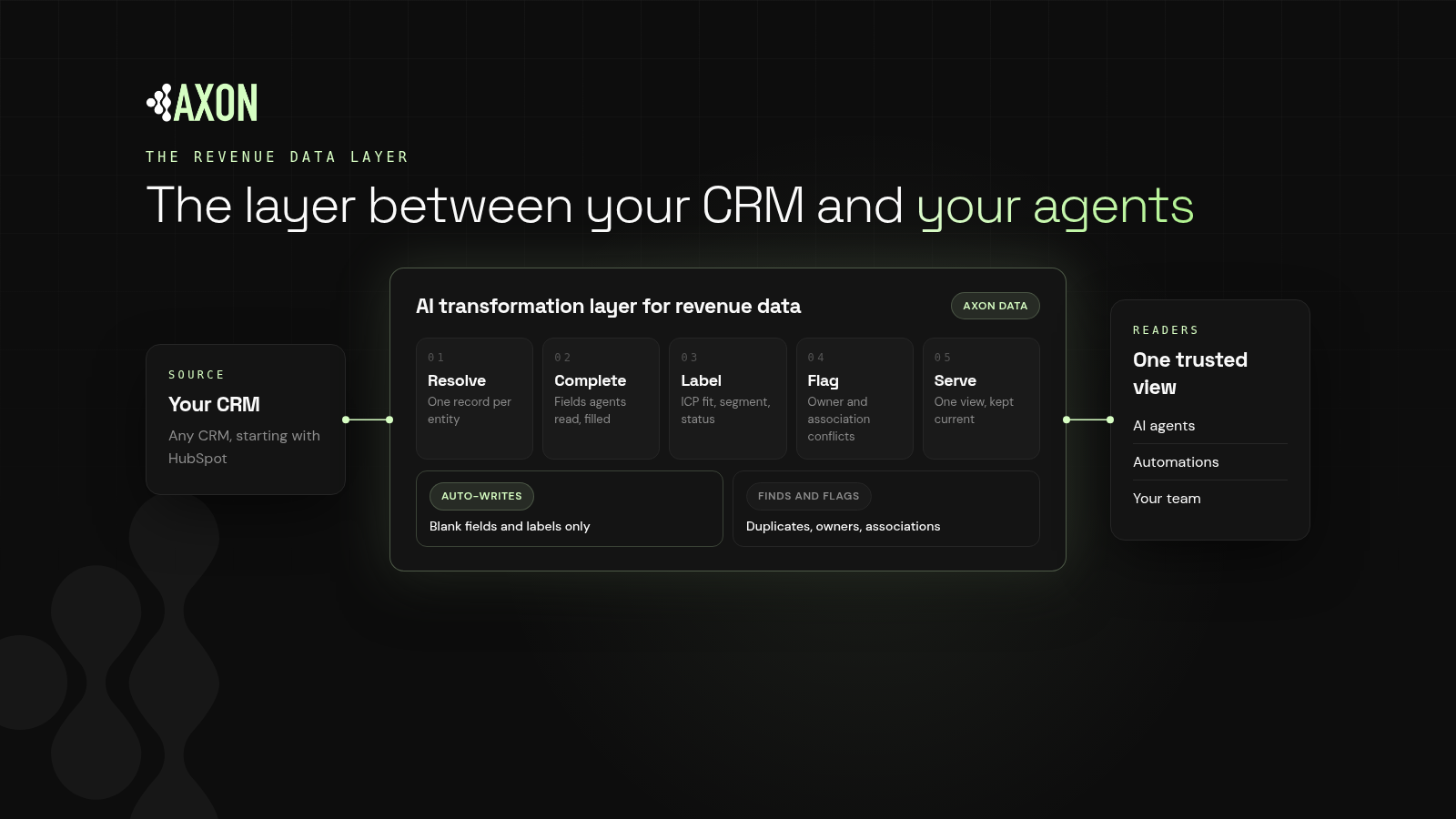
Figure: The revenue data layer sits between any CRM and its readers. It resolves, completes, labels and flags records continuously, and serves one consistent view to agents, automations and your team.
Why do AI agents need a revenue data layer?
Definition: A revenue data layer is the AI transformation layer for revenue data. It sits between the CRM and its readers and continuously keeps records unique, complete, labeled and conflict-flagged.
CRMs are built by humans, one record at a time, over years. In a sales-led HubSpot portal, they collect duplicates from forms, imports and list uploads, blanks from reps rushing to log a deal, and owner conflicts every time territories are redrawn or a rep leaves. People work around this with memory and judgment. Agents can't.
Three things happen when agents read raw CRM data:
They act on the wrong record
An agent that finds two records for one company may pick the one with the stale owner or the outdated status. It doesn't hesitate. It routes, emails or summarizes based on whichever record it read.
They re-derive the same answer, differently
Ask "is this account a good fit?" and an agent may look at industry, size, country, deal history and a dozen custom fields. A different agent may weigh them differently. Without a shared label, two agents can give two answers about one account.
They burn effort reconciling
When records are messy, agents pull extra records, activity and fields to work out what's true. That costs time and compute on every request, and the extra context gives them more chances to pick the wrong fact. An agent that reads one clean, labeled record has less to reconcile and less to get wrong.
What does a revenue data layer do?
A revenue data layer has five jobs. Each one maps to a failure mode that agents hit.
1. Resolve: one record per real-world entity
The layer finds likely duplicate people, companies and deals. Because merges are hard to reverse, a trustworthy layer finds and flags duplicates with a suggested fix rather than merging silently.
2. Complete: the fields agents read are filled
The layer fills blank fields that downstream readers depend on, such as industry, company size and country. Writing into an empty field doesn't overwrite anyone's work, so it's safe to automate.
3. Label: every record carries its meaning
Definition: Record labeling is attaching a consistent, machine-readable classification, such as ICP fit, segment or status, to each record so every reader interprets it the same way.
Labels turn twenty fields into one answer, which is the core of AI-ready CRM data. Agents read the label instead of rebuilding it, which keeps behavior consistent across workflows.
4. Flag: conflicts surface before agents act
Owner mismatches between contacts, companies and deals, and broken associations such as a deal with no company, are found and flagged for a person to review.
5. Serve and monitor: one view, kept current
The layer serves agents, automations and people the same consistent view, and keeps checking as new records arrive. Without monitoring, a clean CRM starts drifting the day the cleanup ends.
Is a revenue data layer the same as a CRM or a data warehouse?
- Not a new CRM. Your CRM stays the system of record. The layer works on the data you already have.
- Not a warehouse project. A warehouse stores data for analysis. A revenue data layer keeps the operational records agents act on trustworthy, in place.
- Not just enrichment. Adding outside data helps fill gaps, but it doesn't resolve duplicates or conflicts.
- Not a one-time cleanup. The value is that it keeps running.
- Not tied to one model. If the data is right, you can change the agent or model underneath without starting over.
Should a revenue data layer change CRM data automatically?
Key idea: Automate the additive. Flag the judgment calls.
A layer that rewrites owners or merges records on its own can break territory rules and erode trust in the CRM. A safer design splits changes into two groups:
| Change | Why | How it's handled |
|---|---|---|
| Blank fields | Additive; overwrites nothing | Written automatically |
| Labels | Additive; adds meaning | Written automatically |
| Duplicates | Hard to reverse | Found and flagged for approval |
| Owner conflicts | Affects territories and routing | Found and flagged for approval |
| Broken associations | Needs context | Found and flagged for approval |
How does Axon Data work as a revenue data layer?
Axon Data is the AI transformation layer for revenue data. It works with any CRM, starting with HubSpot, and runs continuously, never as a one-time cleanup.
- It finds and flags duplicates, owner conflicts and broken associations, and suggests a fix your admin approves, one record or many at once.
- It only auto-writes blank fields and labels.
- It labels every record so agents, automations and your team read one consistent answer.
How do you get started with a revenue data layer?
- List your readers. Which agents, automations, rep views and forecast reports read the CRM today, and which are coming?
- List what they read. Note the fields, labels and associations each one depends on.
- Scan for gaps. Measure duplicates, blanks, missing labels and conflicts in those fields. Start with a free CRM scan or the agent-ready CRM checklist.
- Turn on the safe automation. Fill blanks and add labels.
- Review the flags. Approve fixes for duplicates, owners and associations.
- Keep it running. Let the layer check new records as they arrive.
What else do people ask about revenue data layers?
What is a revenue data layer?
It's a continuous layer between your CRM and its readers that keeps records unique, complete, labeled and conflict-flagged, so agents, automations and people all read one trustworthy view.
How is a revenue data layer different from a CRM?
The CRM is the system of record where data is stored and edited. The revenue data layer works on top of it, keeping that data clean and labeled for machine readers.
Why do AI agents need a revenue data layer?
Agents take records at face value. Duplicates, blanks and conflicts turn directly into wrong actions. A layer resolves those issues and gives agents labels instead of raw fields to interpret.
Does a revenue data layer change my CRM data automatically?
A well-designed one only automates additive changes. Axon Data auto-writes only blank fields and labels, and finds and flags duplicates, owners and associations for your admin to approve.
Which CRMs does Axon Data work with?
Axon Data works with any CRM, starting with HubSpot.
See where your CRM stands today: duplicates, blank fields, owner conflicts and broken associations.
Get a free CRM scan